The new YouTube feature DASH, has disabled the ability to buffer the entire video, instead now it buffers only a small block. Dont know exactly why YouTube added this feature?, but may be they wanted to help mobile phone users who have 2G/3G Internet Data Connection because they are billed for the data usage by Moblile Service Operators.



UPDATE (07-Jan - 2015)
With the latest update of Firefox to 34.0.5 version, this process is not working. We have to wait for new patch update from the Youtube Center Developer
Anyway this sucks for the desktop users who have unlimited download Internet Service Connection because:
- If you want to rewind the video, YouTube has to redownload it again
- If you pause the video, YouTube will not continue with the download of the video.
Luckily there is a workaround in disabling this YouTube's DASH feature, by using YouTube Center, a browser extension that is availble for Firefox, Chrone, Safari and Opera.
Install YouTubeCenter in Firefox
- Download this addon https://addons.mozilla.org/en-us/firefox/addon/youtube-center/
- Click on "Add to Firefox" button to install.
- Press "Allow" on the permission to install.
- After installation is complete, goto "Options" of YouTubeCenter and then configure the settings.
Disable DASH in YouTubeCenter in Firefox
Some users who have previously installed this addon are not able to disable DASH after the latest update, its because this setting doesn't work well in HTML5 Player mode. For more technical info on Why DASH doesn't work with HTML5 player.
The following settings will help users to disable the DASH in YouTube.
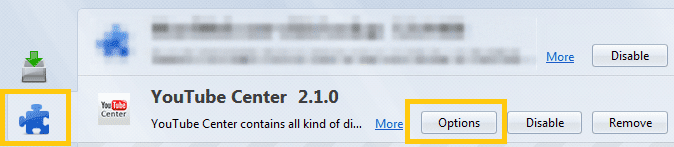
1. Click on YouTubeCenter "Options" . (Click on Firefox Settings  button >Add-ons >Extensions>YouTubeCenter Options )
button >Add-ons >Extensions>YouTubeCenter Options )
2. Disable "DASH Playback" . (Goto "Player" left menu > "General" Tab > "DASH Playback" )
3. Set "Player type" to "Flash".
4. Set "Flash WMode" to "Direct".
8. Set "Auto resolution" to anything other than "1080p" and "480p". (Goto "Player" left menu > "Resolution" Tab) . You can set values to {144p | 240p | 360p | 720p }
9. Disable "DASH Playback" . (Goto "External Players" left menu > "Embed" Tab > "DASH Playback" ) Likewise repeat the same steps as in step 2 - 8 for "Embedded External Player"
10. Disable "DASH Playback" . (Goto "External Players" left menu > "Channel" Tab > "DASH Playback" ) Likewise repeat the same steps as in step 2 - 8 for "Channel External Player"
11. Close the YouTubeCenter Settings and Restart the Firefox.
Now start buffering videos in YouTube like the old times.
UPDATE (07-Jan - 2015)
With the latest update of Firefox to 34.0.5 version, this process is not working. We have to wait for new patch update from the Youtube Center Developer
UPDATE (01-Oct - 2015)
The add-on currently available in AddOns Mozilla Firefox is not working. But there is a workaround to it which i tried on 09-Sept-2015 and after testing for a month, it is stable and it worked for me.
https://github.com/YePpHa/YouTubeCenter/wiki/Developer-Version
1. Goto the above link and download the Developer version for Firefox
YouTubeCenter.xpi
2. After downloading the file, goto Add-ons Manager in Firefox
3. Click on the Tools for Add-ons Gear Icon at the Top Right

4. Click "Install Add-ons From File..."
5. Browse and Select the downloaded YouTubeCenter.xpi and click Open

6. Click Install

Now you are ready to use the Youtube Center Developer build version and Configure the above settings.
Note:
Issue: When Dash is disabled, Video quality settings for each video starts from minimum 360p instead of 144p
The add-on currently available in AddOns Mozilla Firefox is not working. But there is a workaround to it which i tried on 09-Sept-2015 and after testing for a month, it is stable and it worked for me.
https://github.com/YePpHa/YouTubeCenter/wiki/Developer-Version
1. Goto the above link and download the Developer version for Firefox
YouTubeCenter.xpi
2. After downloading the file, goto Add-ons Manager in Firefox
3. Click on the Tools for Add-ons Gear Icon at the Top Right
4. Click "Install Add-ons From File..."
5. Browse and Select the downloaded YouTubeCenter.xpi and click Open
6. Click Install
Now you are ready to use the Youtube Center Developer build version and Configure the above settings.
Note:
- Since this is the developer version and new changes are made to the download, it may not be always stable.
Issue: When Dash is disabled, Video quality settings for each video starts from minimum 360p instead of 144p


